
Product Design

BYTEY - Onboarding

Reinventing Onboarding Through Structured Testing and Iteration

​

Bytey’s onboarding is built around three core modules:

  • Taste Tags (mandatory)
  • Avatar Profile (progressive)
  • Account (progressive OTP)

​

Across four progressively refined flows, we balanced speed, personal relevance, and low friction—resulting in a final onboarding experience that delivers immediate value with minimal cognitive load.

Optimized Final Flow (Open Launch)

Progressive onboarding focused on speed to value

  • Only essential signal collected up front: Taste Tags.
  • Everything else (account, avatar, features) appears contextually later.

​

Goal: better recommendations immediately while keeping early friction low.

What is solves?

Faster path to value

Users reach the Main page quickly with high‑quality recs on first load.

Lower friction

Account creation and avatar are deferred until needed.

Clear mental model

Location is requested at the moment it matters (first entry to Main), gamification is introduced in‑context with tips triggered at first touch

3 Core Modules

Taste Tags

→ Mandatory, Fast, 3 Screens

The most critical step for personalization.

​

Evolved from regional + flavor taxonomy to a concise, confidence-boosting flow:

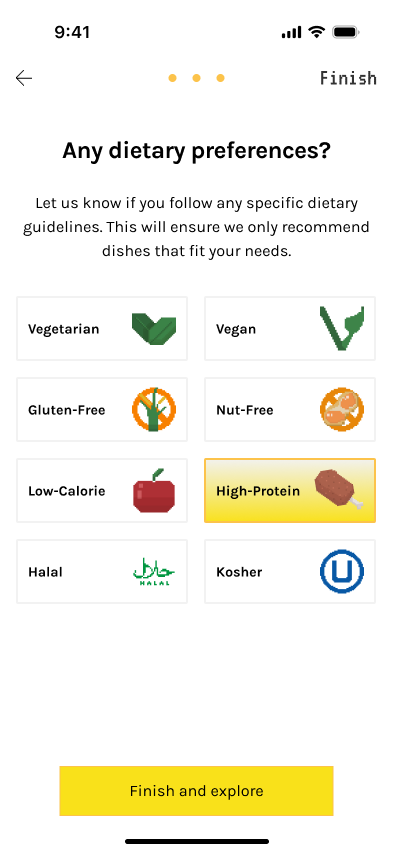
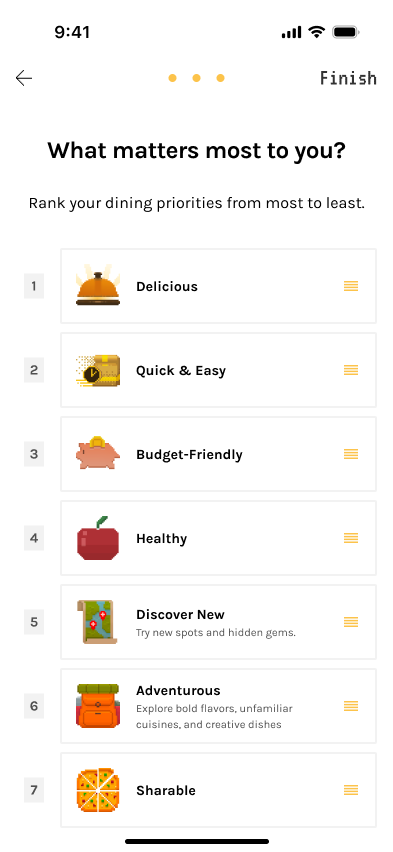
Cuisine (required) → Diet (opt) → Priority Ranking (opt)

​

Clear helper text + micro-interactions reduced uncertainty and kept completion time under ~45 seconds.

Avatar Profile

→ Deferred, Reward-driven

Character setup moved from upfront to task-based and post-engagement*, resulting in higher completion without slowing entry while maintaining Bytey’s playful tone.

*Nudge user after placing or finishing first order, from Me/SuperHub, on tracking page, etc.

Optional until users want cosmetic/social features.

Account signup

→ Progressive OTP

Users create an account only when needed*.

Password-less OTP enhances verification rates and reduces friction while maintaining security basics without cognitive load, aligning with mobile norms.

*Gate on: place order, save avatar, interact in community, after viewing ~10 posts, saving lists, etc.

HOW WE GOT HERE?

đŸ€ł Onboarding flows user testings

I began by modeling each setup independently (Account, Taste Tags, Avatar, Location, Gamification guidance), then recomposed them into end‑to‑end flows. 
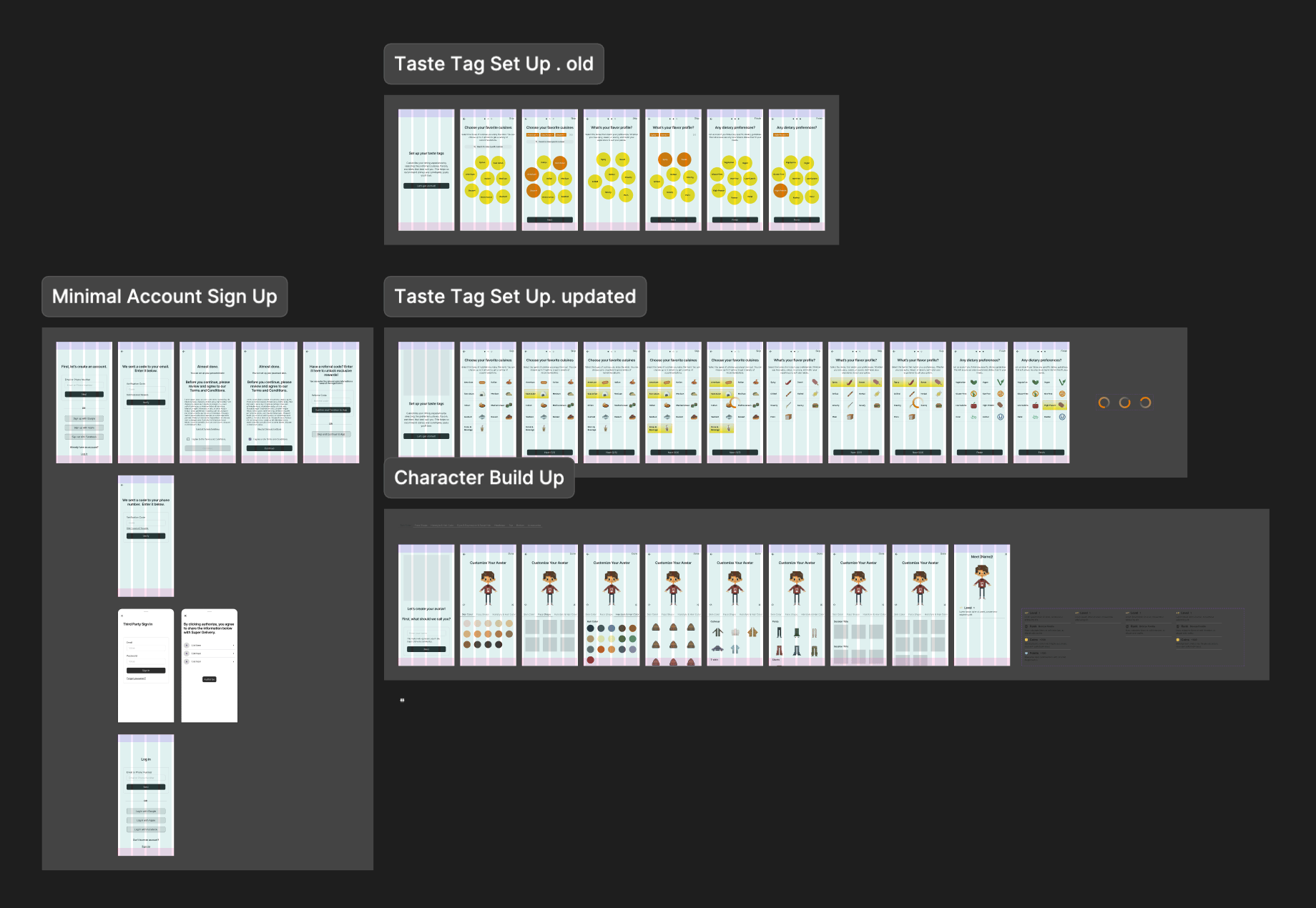
Flow 1/ All-Upfront (Baseline)

Complete setup required before reaching the home page.

✅ What Went Well

  • Consistent initial dataset; fewer interruptions later.
  • Few people who love customization enjoyed avatar up front.
  • Clear sense of Bytey’s scope and features.
  • Valuable as a control.

‌ What Went Wrong

  • Long time‑to‑home; fatigue; drop‑offs during Avatar.
  • Perceived as "too much before trying anything."

📊 Indicative metrics

Median time to Home

2m05s

Flow completion

54%

“Too long” feedback

~75%

(n≈26)

Flow 2/ Defer Avatar

Shorten onboarding by defering non‑critical steps while keeping strong recommendations.

✅ What Went Well

  • Shorter flow; perceived “lighter” onboarding; better focus on recommendations.
  • Avatar completion improved when framed as a reward.

‌ What Went Wrong

  • Still felt long to some users.
  • Account upfront still created early abandonment.

📊 Indicative metrics

Median time to Home

1m22s

Flow completion

68%

(n≈28)

Flow 3/ Taste-First

Enable a progressive account setup to allow users to access the app sooner.
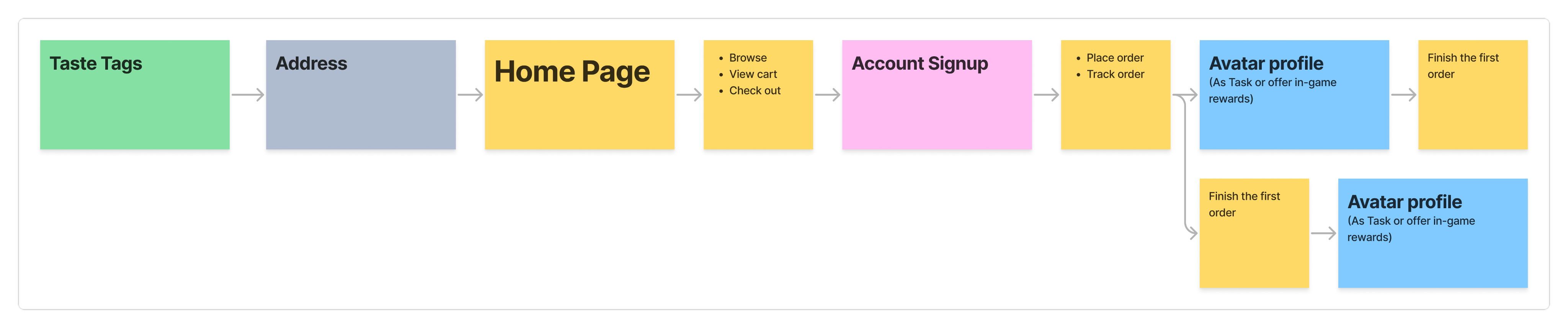
✅ What Went Well

  • Strong early relevance; better first‑session engagement.

‌ What Went Wrong

  • A subset was unsure what to pick; wanted a skip.

📊 Indicative metrics

Median time to Home

0m52s

Flow completion

82%

(n≈32)

Flow 4/ Progressive Disclosure

Push friction as late as possible. Introduce setup only when a feature requires it.

  • All skippable initially; surface steps contextually (banners, overlays, first‑touch triggers).
  • Account at checkout / save / deeper actions; Avatar via tasks/rewards; Taste Tags initially skippable.
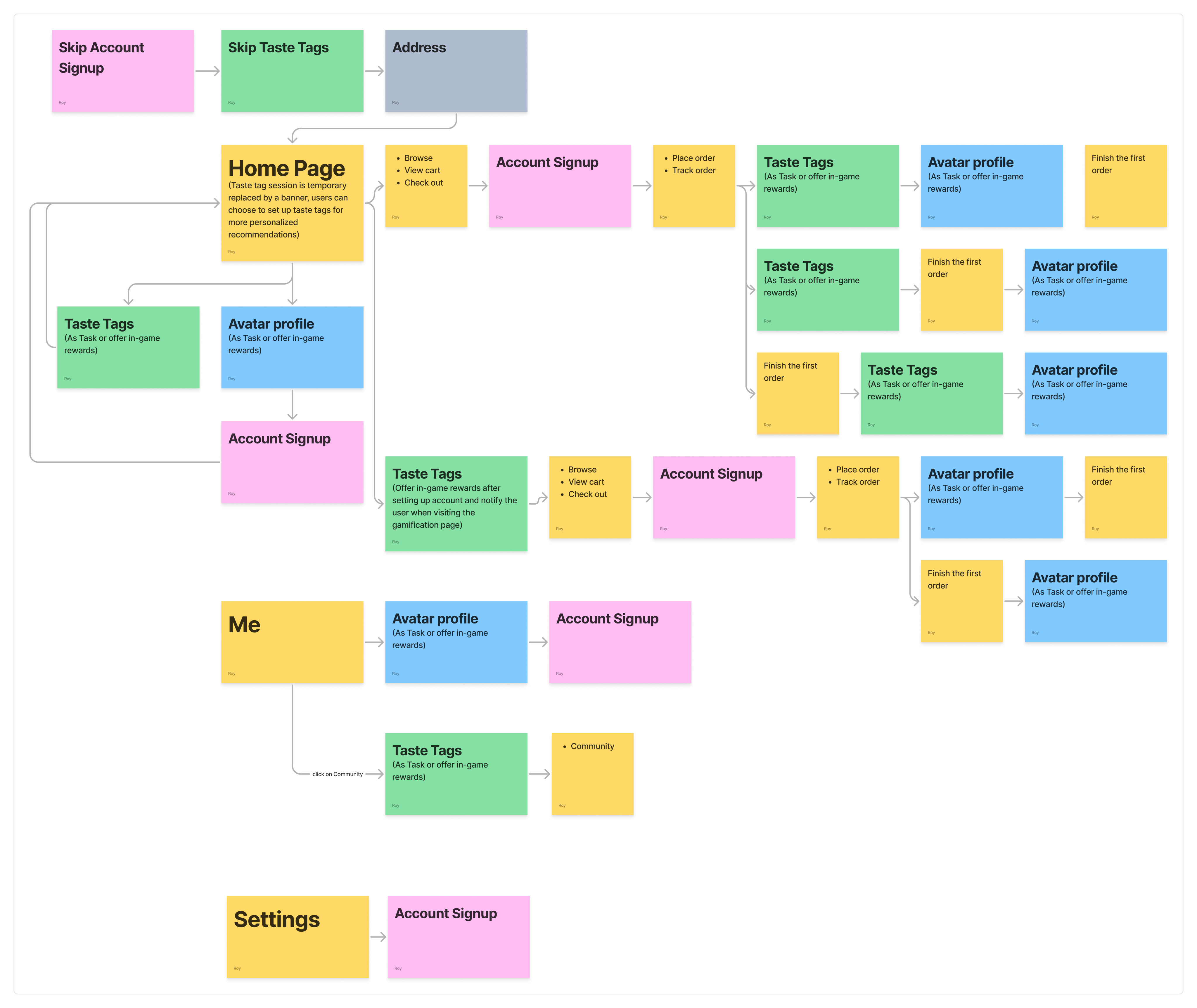
✅ What Went Well

  • Shortest path to value; very strong preference in testing for overall simplicity.

‌ What Went Wrong

  • Taste Tag prompts were missed or treated like ads
  • Some users later felt the app lacked “personality” without early tags. Initial recs lost some sparkle.

📊 Indicative metrics

Median time to Home

0m34s

First-session activation into search/categories

+21–27%

vs Flow 2

Preference in qualitative ranking

≈68% chose Flow 4

“Banner looked like ads”

~23%

(n≈34)

User Testing Summary

General feedback (majority)

  • Flow 4 preferred for brevity and clarity.
  • Flow 1 felt too long; Flow 2 split opinions; Flow 3 largely acceptable.
  • Avatar is more reasonable after trying the core experience; a minority loved it early.
  • Some wanted Taste Tags skippable at first because they were unsure what to pick.
  • People love OTP.

Specific feedback (minority)

  • A subset found Avatar fun/engaging up front, but we assessed higher drop‑off risk.
  • Taste Tags created choice overload at first; better once they knew the app.

Final Flow (Best of Flow 3 + Flow 4)
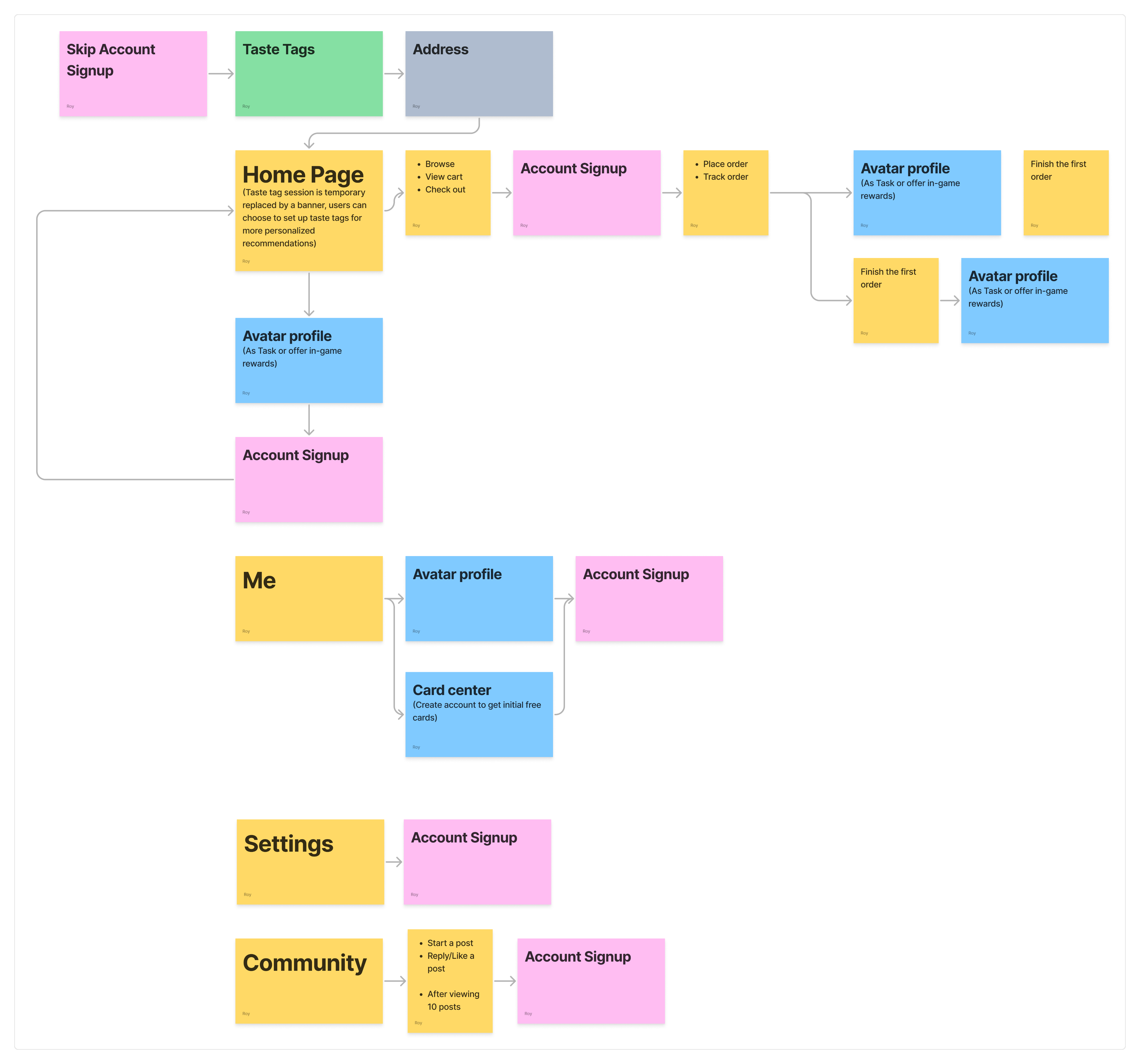
Decisions

  • Keep progressive account and progressive avatar from Flow 4.
  • Keep OTP (No passwords) for account sign-up.
  • Make Taste Tags mandatory—shortened and clarified—to lift recommendation quality and session satisfaction from day 0.
  • Location stays at first Main entry.
  • Keep avatar as a quest with small rewards and multiple entry points.

Why this trade‑off works

  • A small upfront step (Taste Tags) substantially improves personalization and reduces bounce from “generic” results.
  • Users still get speed: 3 short screens with clear helper text and modern micro‑interactions.
  • Since Taste Tag setup is non-skippable, Taste Tag UI needs to be re‑written to reduce ambiguity and indecision (updated tags* that better reflect the user needs, short descriptions, icon labels).

đŸ“© Invite‑Only Variant (Public Test Phase)

Before open public launch, Bytey are currently using an Invite Gate to control test cohorts, monitor onboarding metrics, and maintain community quality.

Interface & flow

  • Invite gate: Enter code → go through, or Join Waitlist path.
  • Account setup immediately after the gate via OTP (code to email/phone).
  • Taste Tags flow next (same 3 screens).
  • Avatar still progressive post‑entry.
  • Branded illustrations + light animation to convey warmth and core features; clear dual CTA states (have a code / need a code).
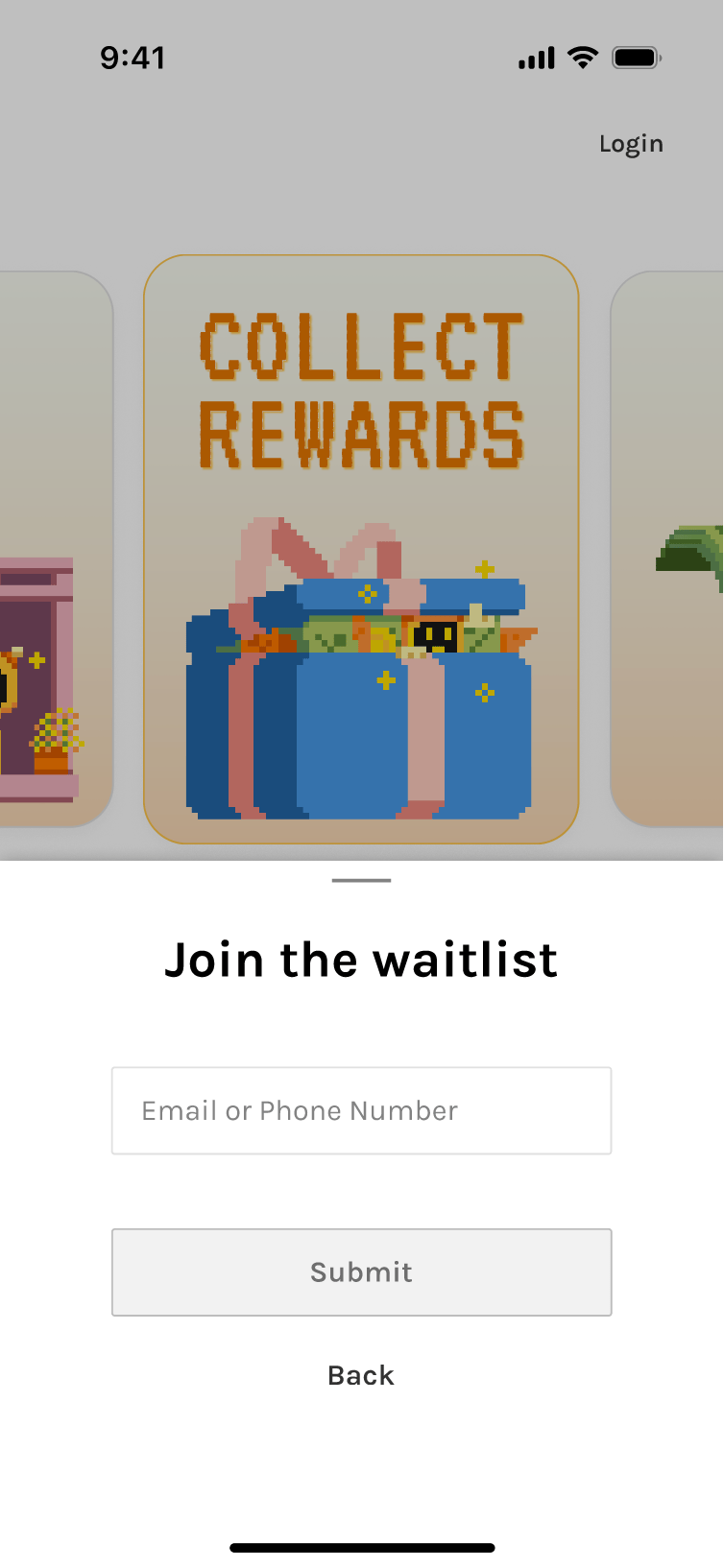
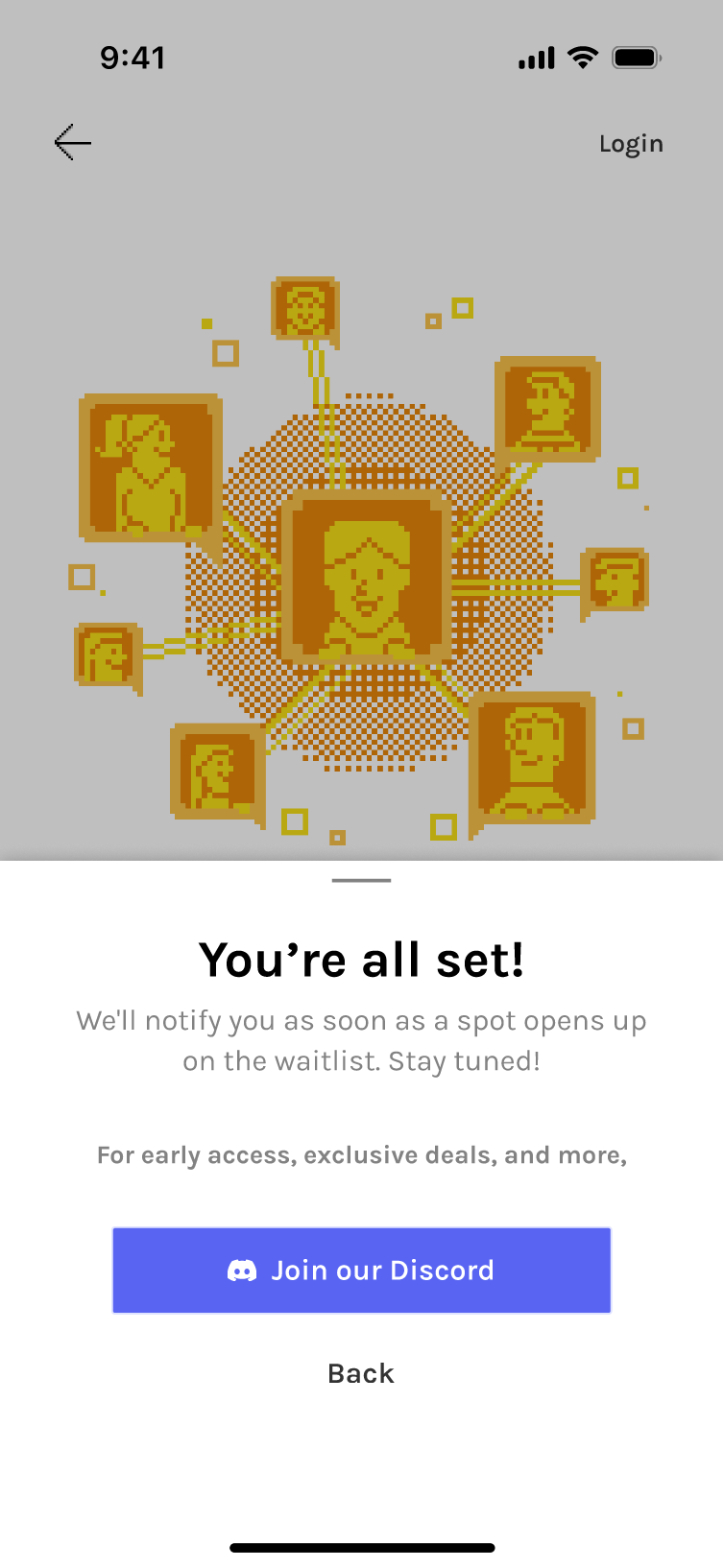
Variants tested: different animations, speeds, and code input affordances.

​

Accessibility: numeric keypad on mobile, obvious error/empty states, clear waitlist confirmation feedback.

đŸœ Taste Tag System Iterations

Taste Tags are not just onboarding UI. They are core product infrastructure. As the product designer, I worked closely with engineers to shape the taxonomy behind the system, bridging user behavior and system architecture.

🔑 Influences

Search relevance and restaurant/food discovery (core)

Data organization and cleansing (foundation)

Recommendation ranking

Community content (posts and feed relevance)

Gamified task and card system

đŸš« Key constraints

  • Dataset limitations: Early database does not contain every cuisine, dish, or restaurant type.
  • Tags must prioritize what exists today while preparing for future expansion as new cuisines, dishes, and restaurants are added.

🏁 Goal

  • A structure that is clear for users and usable by algorithms.

đŸ€”Â Design considerations

User cognition

How people actually think about food.

Product needs

Fast onboarding and strong personalization.

Technical constraints

Data schema, embeddings, and ranking logic.

v1/ Regional (1-3) → Flavor (≄1 or Skippable) → Diet (opt)

This early version established the initial Taste Tag structure using the first dataset, focused on the most common cuisines around the testing area.

✅ What Went Well

  • Worked with the initial dataset, focusing on popular cuisines in the testing area to set a clear baseline for early testing.

‌ What Went Wrong

  • Flavor step may be unclear for some users with low selection confidence as,
    • Flavor preferences change frequently.
    • Flavor perception is subjective.
  • Hard to structure in data and many dishes are customizable.

v2/ Regional (1-3) → Diet (opt) → Priority (ranking)

Flavor was replaced with a ranked Priority step, as ordering priorities proved to be a clearer and more actionable signal than flavor.

✅ What Went Well

  • Priority reflects real ordering behavior.

‌ What Went Wrong

  • Diet taxonomy needed refinement due to data constraints and potential AI hallucination.
    • Some diet types (e.g., vegan) were well labeled in restaurant data, while others (religious diets) were inconsistent.
    • Religious diet labels carried higher risk due to less reliable menu data and AI hallucination
  • Diet restrictions and preference-based goals were still mixed together, making the category less clear and less aligned with user expectations.

v3/ Regional (1-3) → Diet (opt) → Eating Style (opt) → Priority (ranking)

Separated Diet from Eating Style to keep Diet focused on dietary restrictions, while moving preference-based goals like Low-calorie and High-protein into Eating Style and combining some flavor ideas with food types there.

✅ What Went Well

  • Clearer system logic and better match with user expectations.

‌ What Went Wrong

  • 4 screens felt long and added onboarding complexity.
  • Richer taxonomy, but limited payoff relative to the time required.

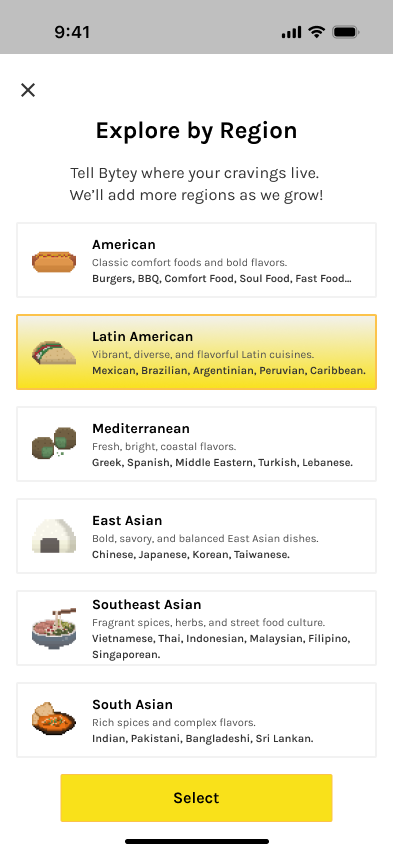
Final/ Updated Cuisine (required) → Diet (opt) → Priority (ranking)

Main changes: updated Cuisine and removed Eating Style. More Diet and Priority to accomodate user needs

The final version uses a more organic structure—Popular Picks + a general Regional sheet—to keep onboarding short while leaving room to scale cuisine organization over time.

✅ What Went Well

  • More flexible and organic than a fully fixed cuisine taxonomy.
  • Better fit for current data coverage and onboarding speed.
  • Easier to expand later with broader regional models or more detailed subcategories*.

📊 Indicative metrics

Median completion time

< 35s

Abandon

< 5%

“Not sure what to pick”

↓ to ~12–15%

© ROY YANG 2026

All Rights Reserved

Product Design

BYTEY - Onboarding

Reinventing Onboarding Through Structured Testing and Iteration

​

Bytey’s onboarding is built around three core modules:

  • Taste Tags (mandatory)
  • Avatar Profile (progressive)
  • Account (progressive OTP)

​

Across four progressively refined flows, we balanced speed, personal relevance, and low friction—resulting in a final onboarding experience that delivers immediate value with minimal cognitive load.

Optimized Final Flow (Open Launch)

Progressive onboarding focused on speed to value

  • Only essential signal collected up front: Taste Tags.
  • Everything else (account, avatar, features) appears contextually later.

​

Goal: better recommendations immediately while keeping early friction low.

What is solves?

Faster path to value

Users reach the Main page quickly with high‑quality recs on first load.

Lower friction

Account creation and avatar are deferred until needed.

Clear mental model

Location is requested at the moment it matters (first entry to Main), gamification is introduced in‑context with tips triggered at first touch

3 Core Modules

Taste Tags

→ Mandatory, Fast, 3 Screens

The most critical step for personalization.

​

Evolved from regional + flavor taxonomy to a concise, confidence-boosting flow:

Cuisine (required) → Diet (opt) → Priority Ranking (opt)

​

Clear helper text + micro-interactions reduced uncertainty and kept completion time under ~45 seconds.

Avatar Profile

→ Deferred, Reward-driven

Character setup moved from upfront to task-based and post-engagement*, resulting in higher completion without slowing entry while maintaining Bytey’s playful tone.

*Nudge user after placing or finishing first order, from Me/SuperHub, on tracking page, etc.

Optional until users want cosmetic/social features.

Account signup

→ Progressive OTP

Users create an account only when needed*.

Password-less OTP enhances verification rates and reduces friction while maintaining security basics without cognitive load, aligning with mobile norms.

*Gate on: place order, save avatar, interact in community, after viewing ~10 posts, saving lists, etc.

HOW WE GOT HERE?

đŸ€ł Onboarding flows user testings

I began by modeling each setup independently (Account, Taste Tags, Avatar, Location, Gamification guidance), then recomposed them into end‑to‑end flows. 

Flow 1/ All-Upfront (Baseline)

Complete setup required before reaching the home page.

✅ What Went Well

  • Consistent initial dataset; fewer interruptions later.
  • Few people who love customization enjoyed avatar up front.
  • Clear sense of Bytey’s scope and features.
  • Valuable as a control.

‌ What Went Wrong

  • Long time‑to‑home; fatigue; drop‑offs during Avatar.
  • Perceived as "too much before trying anything."

📊 Indicative metrics

Median time to Home

2m05s

Flow completion

54%

“Too long” feedback

~75%

(n≈26)

Flow 2/ Defer Avatar

Shorten onboarding by defering non‑critical steps while keeping strong recommendations.

✅ What Went Well

  • Shorter flow; perceived “lighter” onboarding; better focus on recommendations.
  • Avatar completion improved when framed as a reward.

‌ What Went Wrong

  • Still felt long to some users.
  • Account upfront still created early abandonment.

📊 Indicative metrics

Median time to Home

1m22s

Flow completion

68%

(n≈28)

Flow 3/ Taste-First

Enable a progressive account setup to allow users to access the app sooner.

✅ What Went Well

  • Strong early relevance; better first‑session engagement.

‌ What Went Wrong

  • A subset was unsure what to pick; wanted a skip.

📊 Indicative metrics

Median time to Home

0m52s

Flow completion

82%

(n≈32)

Flow 4/ Progressive Disclosure

Push friction as late as possible. Introduce setup only when a feature requires it.

  • All skippable initially; surface steps contextually (banners, overlays, first‑touch triggers).
  • Account at checkout / save / deeper actions; Avatar via tasks/rewards; Taste Tags initially skippable.

✅ What Went Well

  • Shortest path to value; very strong preference in testing for overall simplicity.

‌ What Went Wrong

  • Taste Tag prompts were missed or treated like ads
  • Some users later felt the app lacked “personality” without early tags. Initial recs lost some sparkle.

📊 Indicative metrics

Median time to Home

0m34s

First-session activation into search/categories

+21–27%

vs Flow 2

Preference in qualitative ranking

≈68% chose Flow 4

“Banner looked like ads”

~23%

(n≈34)

User Testing Summary

General feedback (majority)

  • Flow 4 preferred for brevity and clarity.
  • Flow 1 felt too long; Flow 2 split opinions; Flow 3 largely acceptable.
  • Avatar is more reasonable after trying the core experience; a minority loved it early.
  • Some wanted Taste Tags skippable at first because they were unsure what to pick.
  • People love OTP.

Specific feedback (minority)

  • A subset found Avatar fun/engaging up front, but we assessed higher drop‑off risk.
  • Taste Tags created choice overload at first; better once they knew the app.

Final Flow (Best of Flow 3 + Flow 4)

Decisions

  • Keep progressive account and progressive avatar from Flow 4.
  • Keep OTP (No passwords) for account sign-up.
  • Make Taste Tags mandatory—shortened and clarified—to lift recommendation quality and session satisfaction from day 0.
  • Location stays at first Main entry.
  • Keep avatar as a quest with small rewards and multiple entry points.

Why this trade‑off works

  • A small upfront step (Taste Tags) substantially improves personalization and reduces bounce from “generic” results.
  • Users still get speed: 3 short screens with clear helper text and modern micro‑interactions.
  • Since Taste Tag setup is non-skippable, Taste Tag UI needs to be re‑written to reduce ambiguity and indecision (updated tags* that better reflect the user needs, short descriptions, icon labels).

đŸ“© Invite‑Only Variant (Public Test Phase)

Before open public launch, Bytey are currently using an Invite Gate to control test cohorts, monitor onboarding metrics, and maintain community quality.

Interface & flow

  • Invite gate: Enter code → go through, or Join Waitlist path.
  • Account setup immediately after the gate via OTP (code to email/phone).
  • Taste Tags flow next (same 3 screens).
  • Avatar still progressive post‑entry.
  • Branded illustrations + light animation to convey warmth and core features; clear dual CTA states (have a code / need a code).
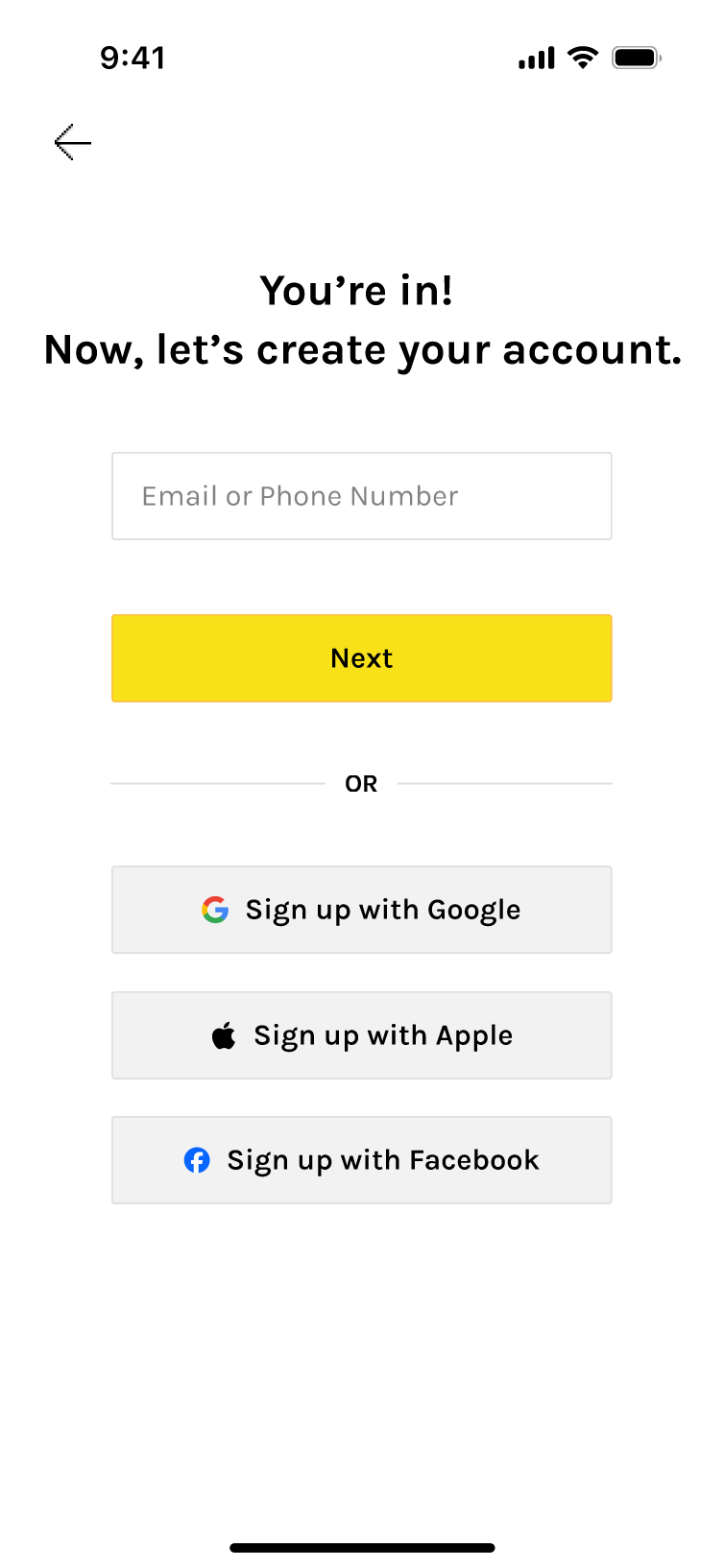
Variants tested: different animations, speeds, and code input affordances.

​

Accessibility: numeric keypad on mobile, obvious error/empty states, clear waitlist confirmation feedback.

đŸœ Taste Tag System Iterations

Taste Tags are not just onboarding UI. They are core product infrastructure. As the product designer, I worked closely with engineers to shape the taxonomy behind the system, bridging user behavior and system architecture.

🔑 Influences

Search relevance and restaurant/food discovery (core)

Data organization and cleansing (foundation)

Recommendation ranking

Community content (posts and feed relevance)

Gamified task and card system

đŸš« Key constraints

  • Dataset limitations: Early database does not contain every cuisine, dish, or restaurant type.
  • Tags must prioritize what exists today while preparing for future expansion as new cuisines, dishes, and restaurants are added.

🏁 Goal

  • A structure that is clear for users and usable by algorithms.

đŸ€”Â Design considerations

User cognition

How people actually think about food.

Product needs

Fast onboarding and strong personalization.

Technical constraints

Data schema, embeddings, and ranking logic.

v1/ Regional (1-3) → Flavor (≄1 or Skippable) → Diet (opt)

This early version established the initial Taste Tag structure using the first dataset, focused on the most common cuisines around the testing area.

✅ What Went Well

  • Worked with the initial dataset, focusing on popular cuisines in the testing area to set a clear baseline for early testing.

‌ What Went Wrong

  • Flavor step may be unclear for some users with low selection confidence as,
    • Flavor preferences change frequently.
    • Flavor perception is subjective.
  • Hard to structure in data and many dishes are customizable.

v2/ Regional (1-3) → Diet (opt) → Priority (ranking)

Flavor was replaced with a ranked Priority step, as ordering priorities proved to be a clearer and more actionable signal than flavor.

✅ What Went Well

  • Priority reflects real ordering behavior.

‌ What Went Wrong

  • Diet taxonomy needed refinement due to data constraints and potential AI hallucination.
    • Some diet types (e.g., vegan) were well labeled in restaurant data, while others (religious diets) were inconsistent.
    • Religious diet labels carried higher risk due to less reliable menu data and AI hallucination
  • Diet restrictions and preference-based goals were still mixed together, making the category less clear and less aligned with user expectations.

v3/ Regional (1-3) → Diet (opt) → Eating Style (opt) → Priority (ranking)

Separated Diet from Eating Style to keep Diet focused on dietary restrictions, while moving preference-based goals like Low-calorie and High-protein into Eating Style and combining some flavor ideas with food types there.

✅ What Went Well

  • Clearer system logic and better match with user expectations.

‌ What Went Wrong

  • 4 screens felt long and added onboarding complexity.
  • Richer taxonomy, but limited payoff relative to the time required.

Final/ Updated Cuisine (required) → Diet (opt) → Priority (ranking)

Main changes: updated Cuisine and removed Eating Style. More Diet and Priority to accomodate user needs

The final version uses a more organic structure—Popular Picks + a general Regional sheet—to keep onboarding short while leaving room to scale cuisine organization over time.

✅ What Went Well

  • More flexible and organic than a fully fixed cuisine taxonomy.
  • Better fit for current data coverage and onboarding speed.
  • Easier to expand later with broader regional models or more detailed subcategories*.

📊 Indicative metrics

Median completion time

< 35s

Abandon

< 5%

“Not sure what to pick”

↓ to ~12–15%

© ROY YANG 2026 All Rights Reserved

Product Design

BYTEY - Onboarding

Reinventing Onboarding Through Structured Testing and Iteration

​

Bytey’s onboarding is built around three core modules:

  • Taste Tags (mandatory)
  • Avatar Profile (progressive)
  • Account (progressive OTP)

​

Across four progressively refined flows, we balanced speed, personal relevance, and low friction—resulting in a final onboarding experience that delivers immediate value with minimal cognitive load.

Optimized Final Flow (Open Launch)

Progressive onboarding focused on speed to value

  • Only essential signal collected up front: Taste Tags.
  • Everything else (account, avatar, features) appears contextually later.

​

Goal: better recommendations immediately while keeping early friction low.

What is solves?

Faster path to value

Users reach the Main page quickly with high‑quality recs on first load.

Lower friction

Account creation and avatar are deferred until needed.

Clear mental model

Location is requested at the moment it matters (first entry to Main), gamification is introduced in‑context with tips triggered at first touch

3 Core Modules

Taste Tags

→ Mandatory, Fast, 3 Screens

The most critical step for personalization.

​

Evolved from regional + flavor taxonomy to a concise, confidence-boosting flow:

Cuisine (required) → Diet (opt) → Priority Ranking (opt)

​

Clear helper text + micro-interactions reduced uncertainty and kept completion time under ~45 seconds.

Avatar Profile

→ Deferred, Reward-driven

Character setup moved from upfront to task-based and post-engagement*, resulting in higher completion without slowing entry while maintaining Bytey’s playful tone.

*Nudge user after placing or finishing first order, from Me/SuperHub, on tracking page, etc.

Optional until users want cosmetic/social features.

Account signup

→ Progressive OTP

Users create an account only when needed*.

Password-less OTP enhances verification rates and reduces friction while maintaining security basics without cognitive load, aligning with mobile norms.

*Gate on: place order, save avatar, interact in community, after viewing ~10 posts, saving lists, etc.

HOW WE GOT HERE?

đŸ€ł Onboarding flows user testings

I began by modeling each setup independently (Account, Taste Tags, Avatar, Location, Gamification guidance), then recomposed them into end‑to‑end flows. 

Flow 1/ All-Upfront (Baseline)

Complete setup required before reaching the home page.

✅ What Went Well

  • Consistent initial dataset; fewer interruptions later.
  • Few people who love customization enjoyed avatar up front.
  • Clear sense of Bytey’s scope and features.
  • Valuable as a control.

‌ What Went Wrong

  • Long time‑to‑home; fatigue; drop‑offs during Avatar.
  • Perceived as "too much before trying anything."

📊 Indicative metrics

Median time to Home

2m05s

Flow completion

54%

“Too long” feedback

~75%

(n≈26)

Flow 2/ Defer Avatar

Shorten onboarding by defering non‑critical steps while keeping strong recommendations.

✅ What Went Well

  • Shorter flow; perceived “lighter” onboarding; better focus on recommendations.
  • Avatar completion improved when framed as a reward.

‌ What Went Wrong

  • Still felt long to some users.
  • Account upfront still created early abandonment.

📊 Indicative metrics

Median time to Home

1m22s

Flow completion

68%

(n≈28)

Flow 3/ Taste-First

Enable a progressive account setup to allow users to access the app sooner.

✅ What Went Well

  • Strong early relevance; better first‑session engagement.

‌ What Went Wrong

  • A subset was unsure what to pick; wanted a skip.

📊 Indicative metrics

Median time to Home

0m52s

Flow completion

82%

(n≈32)

Flow 4/ Progressive Disclosure

Push friction as late as possible. Introduce setup only when a feature requires it.

  • All skippable initially; surface steps contextually (banners, overlays, first‑touch triggers).
  • Account at checkout / save / deeper actions; Avatar via tasks/rewards; Taste Tags initially skippable.

✅ What Went Well

  • Shortest path to value; very strong preference in testing for overall simplicity.

‌ What Went Wrong

  • Taste Tag prompts were missed or treated like ads
  • Some users later felt the app lacked “personality” without early tags. Initial recs lost some sparkle.

📊 Indicative metrics

Median time to Home

0m34s

First-session activation into search/categories

+21–27%

vs Flow 2

Preference in qualitative ranking

≈68% chose Flow 4

“Banner looked like ads”

~23%

(n≈34)

User Testing Summary

General feedback (majority)

  • Flow 4 preferred for brevity and clarity.
  • Flow 1 felt too long; Flow 2 split opinions; Flow 3 largely acceptable.
  • Avatar is more reasonable after trying the core experience; a minority loved it early.
  • Some wanted Taste Tags skippable at first because they were unsure what to pick.
  • People love OTP.

Specific feedback (minority)

  • A subset found Avatar fun/engaging up front, but we assessed higher drop‑off risk.
  • Taste Tags created choice overload at first; better once they knew the app.

Final Flow (Best of Flow 3 + Flow 4)

Decisions

  • Keep progressive account and progressive avatar from Flow 4.
  • Keep OTP (No passwords) for account sign-up.
  • Make Taste Tags mandatory—shortened and clarified—to lift recommendation quality and session satisfaction from day 0.
  • Location stays at first Main entry.
  • Keep avatar as a quest with small rewards and multiple entry points.

Why this trade‑off works

  • A small upfront step (Taste Tags) substantially improves personalization and reduces bounce from “generic” results.
  • Users still get speed: 3 short screens with clear helper text and modern micro‑interactions.
  • Since Taste Tag setup is non-skippable, Taste Tag UI needs to be re‑written to reduce ambiguity and indecision (updated tags* that better reflect the user needs, short descriptions, icon labels).

đŸ“© Invite‑Only Variant (Public Test Phase)

Before open public launch, Bytey are currently using an Invite Gate to control test cohorts, monitor onboarding metrics, and maintain community quality.

Interface & flow

  • Invite gate: Enter code → go through, or Join Waitlist path.
  • Account setup immediately after the gate via OTP (code to email/phone).
  • Taste Tags flow next (same 3 screens).
  • Avatar still progressive post‑entry.
  • Branded illustrations + light animation to convey warmth and core features; clear dual CTA states (have a code / need a code).
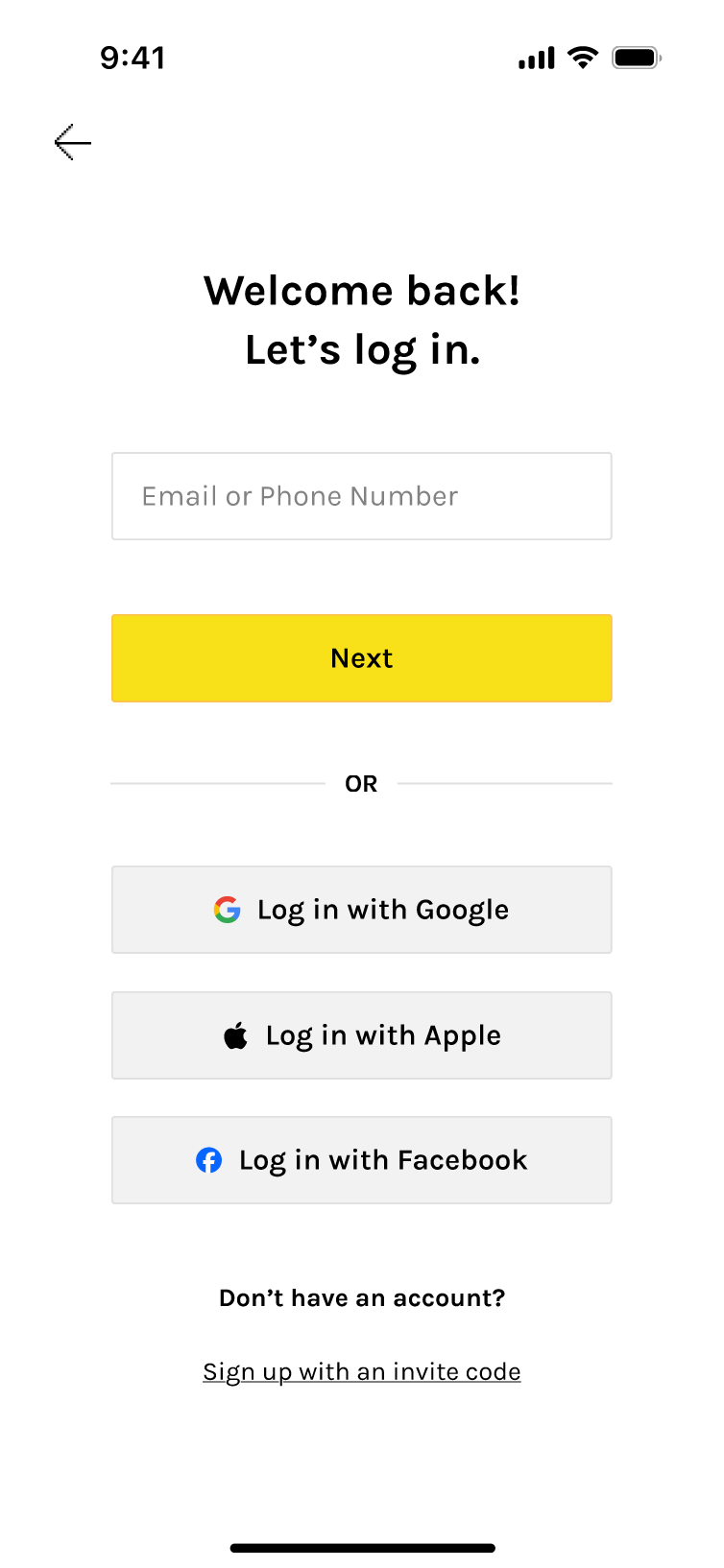
Variants tested: different animations, speeds, and code input affordances.

​

Accessibility: numeric keypad on mobile, obvious error/empty states, clear waitlist confirmation feedback.

đŸœ Taste Tag System Iterations

Taste Tags are not just onboarding UI. They are core product infrastructure. As the product designer, I worked closely with engineers to shape the taxonomy behind the system, bridging user behavior and system architecture.

🔑 Influences

Search relevance and restaurant/food discovery (core)

Data organization and cleansing (foundation)

Recommendation ranking

Community content (posts and feed relevance)

Gamified task and card system

đŸš« Key constraints

  • Dataset limitations: Early database does not contain every cuisine, dish, or restaurant type.
  • Tags must prioritize what exists today while preparing for future expansion as new cuisines, dishes, and restaurants are added.

🏁 Goal

  • A structure that is clear for users and usable by algorithms.

đŸ€”Â Design considerations

User cognition

How people actually think about food.

Product needs

Fast onboarding and strong personalization.

Technical constraints

Data schema, embeddings, and ranking logic.

v1/ Regional (1-3) → Flavor (≄1 or Skippable) → Diet (opt)

This early version established the initial Taste Tag structure using the first dataset, focused on the most common cuisines around the testing area.
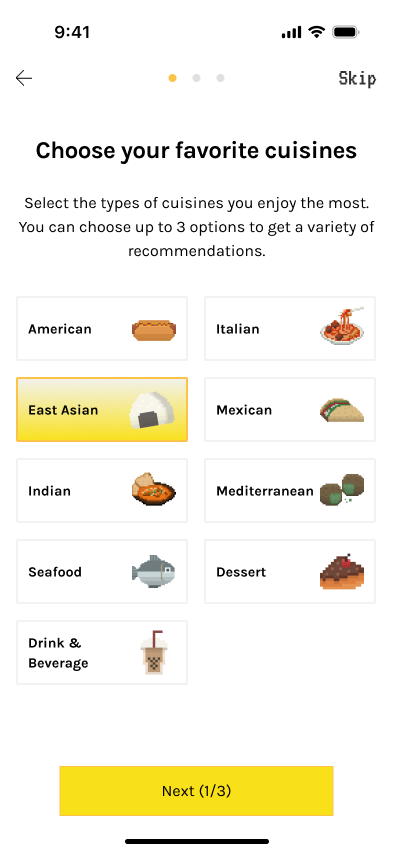
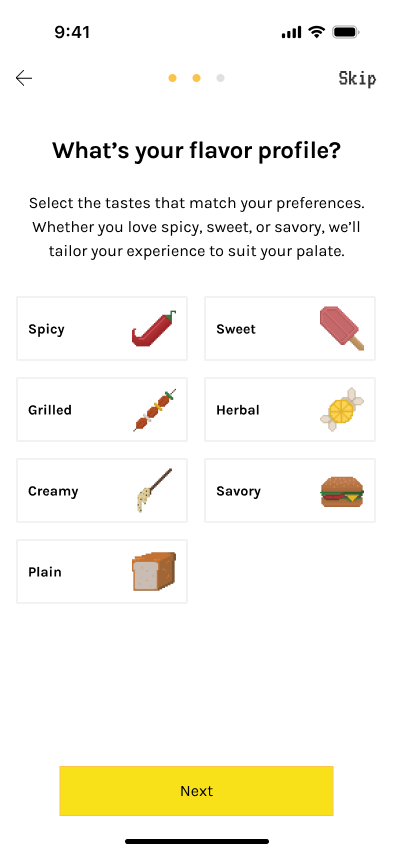
✅ What Went Well

  • Worked with the initial dataset, focusing on popular cuisines in the testing area to set a clear baseline for early testing.

‌ What Went Wrong

  • Flavor step may be unclear for some users with low selection confidence as,
    • Flavor preferences change frequently.
    • Flavor perception is subjective.
  • Hard to structure in data and many dishes are customizable.

v2/ Regional (1-3) → Diet (opt) → Priority (ranking)

Flavor was replaced with a ranked Priority step, as ordering priorities proved to be a clearer and more actionable signal than flavor.
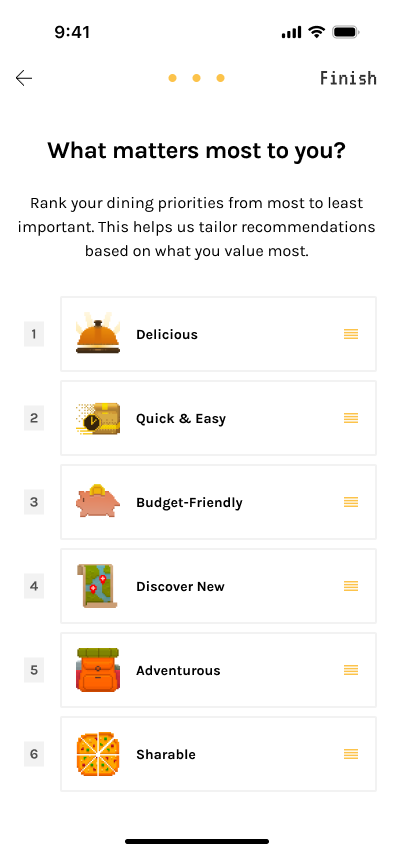
✅ What Went Well

  • Priority reflects real ordering behavior.

‌ What Went Wrong

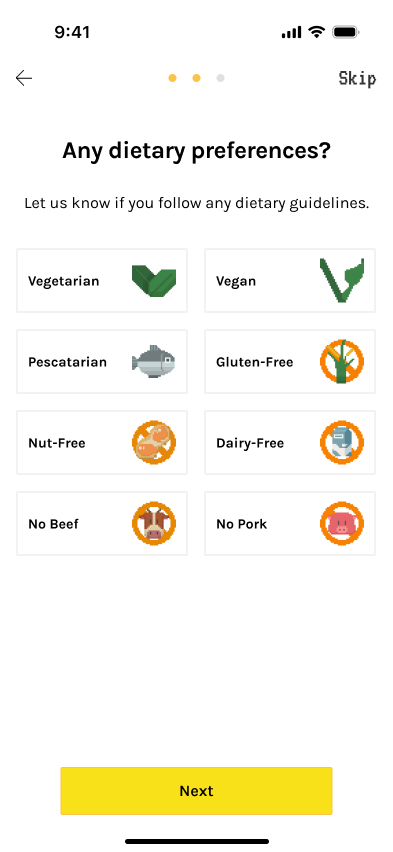
  • Diet taxonomy needed refinement due to data constraints and potential AI hallucination.
    • Some diet types (e.g., vegan) were well labeled in restaurant data, while others (religious diets) were inconsistent.
    • Religious diet labels carried higher risk due to less reliable menu data and AI hallucination
  • Diet restrictions and preference-based goals were still mixed together, making the category less clear and less aligned with user expectations.

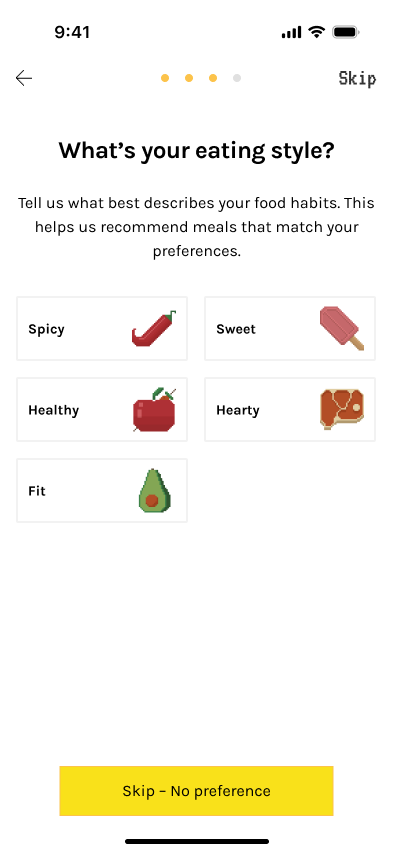
v3/ Regional (1-3) → Diet (opt) → Eating Style (opt) → Priority (ranking)

Separated Diet from Eating Style to keep Diet focused on dietary restrictions, while moving preference-based goals like Low-calorie and High-protein into Eating Style and combining some flavor ideas with food types there.
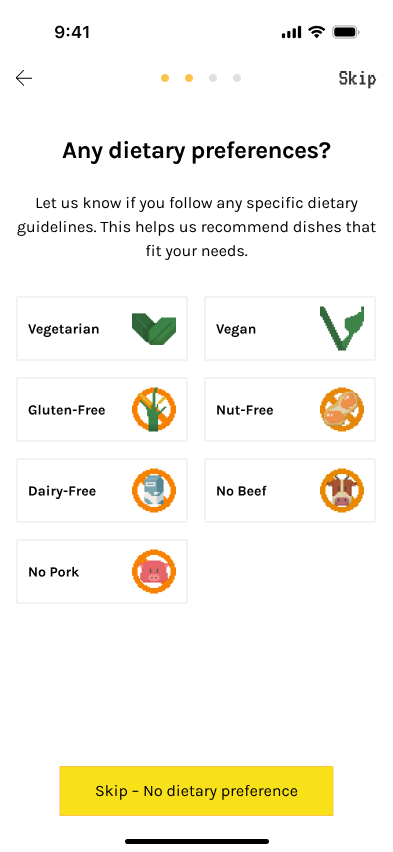
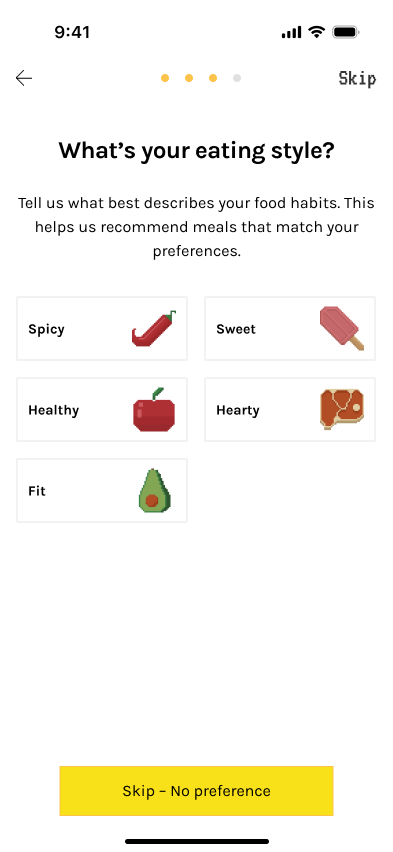
✅ What Went Well

  • Clearer system logic and better match with user expectations.

‌ What Went Wrong

  • 4 screens felt long and added onboarding complexity.
  • Richer taxonomy, but limited payoff relative to the time required.

Final/ Updated Cuisine (required) → Diet (opt) → Priority (ranking)

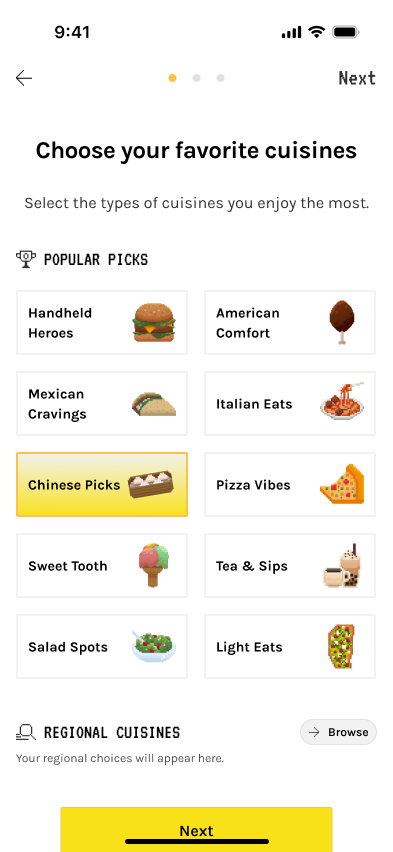
Main changes: major Cuisine redesign and removal of Eating Style. Added one option each to Diet and Priority to preserve key user needs, moving seafood to pescatarian and healthy to Priority.

The final version uses a more organic structure—Popular Picks + a general Regional sheet—to keep onboarding short while leaving room to scale cuisine organization over time.
✅ What Went Well

  • More flexible and organic than a fully fixed cuisine taxonomy.
  • Better fit for current data coverage and onboarding speed.
  • Easier to expand later with broader regional models or more detailed subcategories*.

📊 Indicative metrics

Median completion time

< 35s

Abandon

< 5%

“Not sure what to pick”

↓ to ~12–15%
© ROY YANG 2026 All Rights Reserved